If you searched for a Discord music bot this week, you probably read a guide recommending MEE6's music plugin. That plugin has not existed since February 2023. You may also have been pointed at Groovy, Rythm, Octave or Hydra, all of which lost their music features years ago.
This is not a list of the "best" music bots. It is a status page. Every bot below was checked against its own documentation on 19 July 2026, every price comes from the operator's own billing page, and every command listed is one the bot actually ships. Anything that could not be verified is marked as such.
The Shutdown Timeline
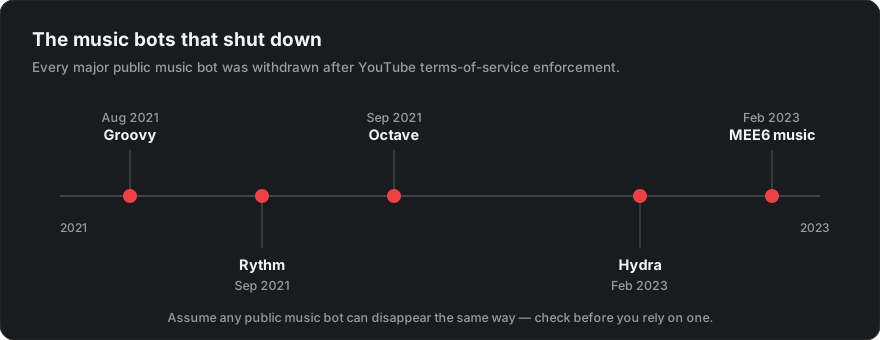
The same dates in text, each with a source:
- Groovy, August 2021. YouTube sent a cease and desist; Groovy shut down on 30 August 2021, having served roughly 16 million servers. YouTube's stated grounds were terms-of-service violations, including commercial use (Gizmodo).
- Rythm, September 2021. The largest music bot on the platform, on more than 20 million servers, was given seven days to comply and went offline on 15 September 2021 (Gizmodo).
- Octave, September 2021. Announced its closure days after Rythm and was offline by the end of the month. Its team said it could not risk the wider organisation for one bot (Passion of the Weiss).
- Hydra, February 2023. Hydra removed all music features on 7 February 2023, one week after receiving a letter from YouTube's legal team on 31 January. Hydra's own post is worth reading: the team had already dropped YouTube link support more than a year earlier and still got the letter (hydra.bot).
- MEE6 music, February 2023. MEE6 announced the end of its music service on 6 February 2023, one day before Hydra. MEE6 itself is very much alive as a moderation and levelling bot; the music plugin is gone, and there is no toggle to bring it back (write-up of the announcement).
Why They Keep Dying
The mechanism is the same every time, and it is structural rather than bad luck.
A bot sources audio from a platform whose terms forbid exactly that. YouTube's Terms of Service prohibit accessing the service by automated means such as bots or scrapers, and prohibit reproducing, transmitting or broadcasting any part of the content except as the service specifically permits. A music bot pulling audio from YouTube and rebroadcasting it into voice channels is doing several of those things at once.
Small bots go unnoticed; growth triggers enforcement. Groovy and Rythm were the two largest, and they went first.
Hydra is the instructive case, because it shows the exposure does not end when you stop using YouTube. Hydra had already removed YouTube support and still received a seven-day legal demand. A three-person team was never going to litigate against Google.
The survivors adapted by moving their audio sourcing off YouTube entirely. Jockie's --search-type option, documented on its own commands page, offers SoundCloud, Spotify, Deezer, Apple Music and Tidal. YouTube is not on the list.
What Still Works
Jockie Music
Last verified: 2026-07-19 against jockiemusic.com/commands and patreon.com/Jockie.
Default prefix is m!, not ?. The free command set covers everything most servers need: m!play (aliased m!p), m!skip (m!s), m!skip to, m!vote skip, m!pause, m!resume, m!queue (m!q), m!now playing (m!np), m!shuffle, m!volume, m!repeat current, m!repeat queue, m!lyrics, m!clear, m!remove, m!seek, m!autoplay toggle and m!leave (aliased m!stop and m!dc). Saved playlists are handled by m!collection create, m!collection save and m!collection load. Run m!prefix to list active prefixes and m!prefix server set to change your server's.
Jockie's homepage documents up to four dedicated bot accounts that act as one, so a busy server can play in more than one voice channel at a time.
Pricing: one figure, and it is $5/month. Jockie's premium runs through Patreon, and the entry paid tier ("Gold Supporter") is $5/month, which grants five "boosts" you assign to servers. This matters because the perks are priced in boosts: m!24/7 costs 5 boosts, so the $5 tier buys 24/7 playback on exactly one server. Audio filters (m!bass boost, m!8d, m!karaoke, m!pitch, m!speed, m!tremolo, m!vibrato and others) are premium and cost 2 boosts. Higher tiers are $10, $15, $25 and $100/month for proportionally more boosts. If you see $3 or $4 quoted elsewhere, that is either out of date or a localised currency display.
Chip
Last verified: 2026-07-19 against chipbot.gg/commands and patreon.com/chipbot.
Chip is slash-command only, which makes it the easier of the two for servers where members will not learn a prefix. Core commands: /play, /skip, /forceskip, /pause, /resume, /np, /queue list, /queue export, /loop, /shuffle, /seek, /move, /remove, /clear queue, /clear filters, /lyrics, /previous, /replay, /duplicates and /stop.
Two details worth knowing. /skip starts a vote and needs 50% of listeners to agree, while /forceskip bypasses it, so queue etiquette is enforced by the bot rather than by your rules channel. And /upload file plays an audio file you supply, which is the one playback route on this page that does not depend on anyone else's catalogue.
DJ permissions are built in. /config dj add [role] designates a DJ role, and /config also sets server defaults for 24/7, autoplay and volume.
Pricing: $5/month. Chip's Patreon "User Premium" tier is $5/month and covers your account only. Its listed perks are 24/7 mode, autoplay, volume control and audio filters, so treat those four as paid features even though they appear in the public command list. "Server Premium" is $12.50/month for up to 10 servers. As with Jockie, Patreon may display these in your local currency, so treat the dollar figures as the reference and check the tier on the page itself.
FredBoat
Last verified: 2026-07-19, with reservations.
FredBoat is one of the longest-running music bots, and it is routinely described as having no premium tier and being "truly free". That is wrong. FredBoat has a Patreon-funded premium tier that gates 24/7 playback, the volume command and Spotify playlist support. Its own donation documentation lists the paid perks as an isolated bot instance, the volume command, and the ability to add Spotify playlists.
The reservation: on 19 July 2026, fredboat.com returned a 522 error on repeated checks, and its public docs site still documents the retired ;; prefix rather than the slash commands the bot moved to. A 522 can be transient and the bot may well be running fine, but we cannot verify its current command set against live first-party documentation the way we can for Jockie and Chip. Check fredboat.com before committing a server to it.
Self-Hosting
The only option nobody else can switch off. You run the bot, so no third party can pull the plug on your instance. We have separate walkthroughs for building a Discord bot and choosing hosting.
The honest caveat: self-hosting removes the platform risk, not the terms-of-service exposure. If your self-hosted bot sources audio from a platform whose terms forbid it, you are now the operator who is doing that. See the legal section below.
Comparison
| Jockie Music | Chip | FredBoat | Self-hosted | |
|---|---|---|---|---|
| Commands | m! prefix and slash | Slash only | Slash | Yours |
| Free tier | Playback, queue, volume, lyrics | Playback, queue, vote-skip, lyrics | Playback, queue | All of it |
| Paid tier | $5/month (Patreon) | $5/month, $12.50 for 10 servers | Patreon tiers | Hosting cost |
| 24/7 playback | Paid (5 boosts) | Paid | Paid | Yes |
| Volume control | Free (m!volume) | Paid | Paid | Yes |
| Audio filters | Paid (2 boosts) | Paid | Not documented | Yes |
| Spotify links | Yes, metadata only | Yes, metadata only | Paid, metadata only | Your choice |
FredBoat's column reflects its still-published donation documentation; its own site was returning errors at the time of writing (see the FredBoat section above), so treat that row as documented-but-not-live-verified.
| Lyrics | Yes (m!lyrics) | Yes (/lyrics) | Not documented | Your choice |
| Play your own files | Not documented | Yes (/upload file) | Not documented | Yes |
| Docs verifiable today | Yes | Yes | No | N/A |
What "Spotify Support" Actually Means
No Discord bot streams audio from Spotify. This is worth stating plainly because the claim appears constantly across bot marketing and how-to guides.
What actually happens: the bot reads metadata from a Spotify link, the track titles, artists and playlist contents, then searches for matching audio on a different source and plays that. FredBoat's own documentation gives the game away when it describes its premium perk as the ability to add Spotify playlists "with tracks found on YouTube and Soundcloud". Jockie's --search-type option makes the same thing explicit by letting you choose which platform the audio is resolved from.
Spotify's Developer Policy closes the door directly. Section III.5 instructs developers not to create any product or service integrated with streams or content from another service, and Section IV.1 restricts streaming through the Spotify Platform to Premium subscribers of the Spotify service itself. Spotify also tightened developer access in early 2026, with compliance deadlines in February and March.
So: Spotify Premium does not "unlock bot streaming", there is no offline playlist sync through a bot, and full-track streaming from Spotify into a voice channel is not a feature anyone can ship. Your Premium subscription matters for Listen Along, which is Discord's own feature, not a bot's.
The 320kbps Myth
Bitrate claims in music bot guides usually quote a source-file number, which is not what reaches your members.
320kbps is a file bitrate. Discord voice channels cap well below it. The default channel bitrate is 64kbps, unboosted servers can go up to 96kbps, and higher ceilings unlock with server boosts: 128kbps at Level 1, 256kbps at Level 2 and 384kbps at Level 3, per Discord's Audio Bitrate FAQ.
The practical consequence: your voice channel setting is the ceiling, not the bot. Raising a bot's quality setting above the channel bitrate changes nothing. If audio quality matters, raise the channel bitrate first, and note that anything past Level 1 requires boosts.
The Legal Reality
We are not lawyers and this is not legal advice. Talk to someone qualified if you need certainty.
That said, one thing is clear enough to state: streaming copyrighted music through a Discord bot generally violates the terms of service of whatever platform the audio comes from, regardless of how big your server is. That is precisely why Groovy, Rythm, Octave, Hydra and MEE6 all lost their music features.
Older guides routinely present a comforting list of "generally OK" uses: private servers, educational purposes, small communities, non-commercial use. None of those are per se fair use for music streaming, and none of them are a safety line. The enforcement that killed these bots was contractual, aimed at bot operators over terms-of-service breaches, not a copyright suit against individual servers. Assume no server size is safe.
If you want to reduce your exposure, the routes that do not depend on somebody else's catalogue are: play audio you own or have licensed (Chip's /upload file), use a royalty-free or explicitly licensed catalogue, or use Discord's own features where each listener streams from their own licensed account.
What Is Structurally Durable
Given the pattern above, these are the approaches that do not carry a shutdown clock:
- Screen share with audio. Go Live and share application audio from your own machine. No third-party service is rebroadcasting anything.
- Watch Together and other activities. Built into Discord, run by Discord, no bot to lose.
- Spotify Listen Along. Each member's own Spotify client plays the track; audio never passes through Discord or a bot, which is why it is licensed and stable. The constraints are real: everyone needs their Spotify account connected to Discord, listeners need Spotify Premium, and it does not work while you are in a voice call. Discord documents it in Listening Along with Spotify.
- Self-hosting, with the terms-of-service caveat above.
Scheduling the Listening Party
Whatever you end up playing music through, the coordination problem is identical and it is the part most servers still get wrong. You post "listening party Friday 8pm EST", and half your members do the timezone maths incorrectly.
Discord's dynamic timestamps solve this natively. A code in the form <t:UNIX:F> renders in each viewer's own local time, so a member in Berlin and a member in São Paulo both read the correct start time without converting anything:
Listening party starts <t:1786147200:F> — that's <t:1786147200:R>
The F style shows the full localised date and time. The R style renders a live countdown that updates itself. Use both in the same announcement: one tells people when, the other tells them how long they have.
You do not need to work out Unix timestamps by hand. Our timestamp generator builds any format code from a date picker, and the countdown generator is the quickest route to the R style specifically. If you want the event to also appear in your server's Events tab with an opt-in reminder, pair it with a Discord Scheduled Event.
Before You Install Anything
This category has a demonstrated history of bots disappearing on a week's notice, so do not build a server ritual around one without a fallback. Verify commands and prices against the operator's own site, because both change and listicles do not. And treat any guide still recommending MEE6 music, Groovy, Rythm, Octave or Hydra as evidence nobody has checked it since 2022.
Verified 19 July 2026. More Discord guides are in the blog.